
Input
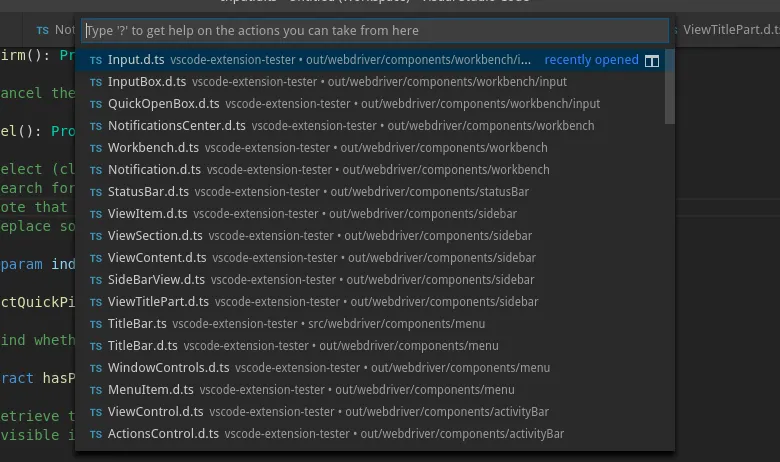
There are two types of input boxes in VS Code: ‘quick input’ and ‘quick open’. They can both be made to look the same, have nearly the same functionality, but different DOM. Hence each is handled by a different page object. Make sure you look for the correct type, otherwise you will likely receive a lookup error.
Another caveat of an input box in VS Code is that unless it has already been opened, the underlying DOM element does not exist. This may result in lookup errors when using the constructor to search for input boxes. Instead, we recommend using the static create method that will safely wait for the element to appear.
InputBox
Section titled “InputBox”This is the page object for the plain and simple input box you either put some text into, or just pick from the quick pick selection.
Lookup
Section titled “Lookup”There are no methods that explicitly open and return a handle to an input box. So first make sure it is opened before you try to handle it.
import { InputBox } from 'vscode-extension-tester';...// safe way to find an inputboxconst input = await InputBox.create();
// only use when manually waiting for the element, or when inputbox has already been openedconst input1 = new InputBox();
Quick Input Message
Section titled “Quick Input Message”The only difference in the GUI to quick open box is the option to display a message underneath a quick input box. To get it, use:
const message = await input.getMessage();InputBox-specific Queries
Section titled “InputBox-specific Queries”// get quick pick items that have a checkboxconst checkboxes = await input.getCheckboxes();// find if the input has an error decorationconst error = await input.hasError();// find if the input is masked as a password fieldconst password = await input.isPassword();QuickOpenBox
Section titled “QuickOpenBox”As of VS Code 1.44.0, QuickOpenBox is no longer in use. InputBox is used exclusively.
Analogically to quick input, this is the page object handling quick open box. This type of input is usually used to (apart from other functions) open files or folders. The command prompt is also built on this element.
Lookup
Section titled “Lookup”import { QuickOpenBox } from 'vscode-extension-tester';...// safe way to find a quickopenboxconst input = await QuickOpenBox.create();
// only use when manually waiting for the element, or when quickopenbox has already been openedconst input1 = new QuickOpenBox();Common Functionality
Section titled “Common Functionality”Text Manipulation
Section titled “Text Manipulation”// get text in the input boxconst text = await input.getText();// replace text in the input box with a stringawait input.setText("amazing text");// clear the text in the input boxawait input.clear();// get the placeholder textconst placeholder = await input.getPlaceHolder();Actions
Section titled “Actions”// confirm (press enter in the input)await input.confirm();// cancel (press escape in the input)await input.cancel();// get quick pick optionsconst picks = await input.getQuickPicks();// search for a quick pick item by text or index and click it (includes scrolling if item is not visible)await input.selectQuickPick(1);await input.selectQuickPick("Input.d.ts");// search for a quick pick item and get a handle for it (includes scrolling if item is not visible)const pick = await input.findQuickPick(1);const pick2 = await input.findQuickPick("Input.d.ts");// confirm the current path in a file/folder picker, appending a path separatorawait input.confirmPath();// check/uncheck all quick pick checkboxes ('Select All' toggle)await input.toggleAllQuickPicks(true);Progress
Section titled “Progress”// find if there is an active progress barconst hasProgress = await input.hasProgress();Title Bar
Section titled “Title Bar”An input box can have its own title bar for the multi step flow
// get the current title, returns undefined if no title bar is presentconst title = await input.getTitle();// click the back button from the title barawait input.back();QuickPickItem
Section titled “QuickPickItem”Page objects retrieved when calling getQuickPick
const picks = await input.getQuickPicks();const pick = picks[0];Actions
Section titled “Actions”// get the item's label (prefer this over the generic getText)const label = await pick.getLabel();// get the item's description if presentconst description = await pick.getDescription();// find if the item is currently selected (highlighted)const selected = await pick.isSelected();// get indexconst index = pick.getIndex();// select (click) the item (recommend to use input.selectQuickPick() if possible)await pick.select();// get action button(s)const buttons = await pick.getActions();const button = await pick.getAction("name");QuickInputAction
Section titled “QuickInputAction”
Page object retrieved when calling getAction or getActions representing Quick Input Actions.
// get labelconst label = await button.getLabel();const label1 = await (await buttons).at(1).getLabel();